NEXr Prism
Empower business users with AI-driven application composition in 90 seconds
NEXr Prism
World First AI Cloud for Business Core and Business Users Build, Scale, Manage any Business AI Apps within 90 Sec.
Overview
NEXr Prism is one of our star services on NEXr Cloud, designed to revolutionize how businesses build and deploy enterprise applications. Unlike traditional ERP vendors that offer 10,000+ different business applications requiring significant budget, time, and dedicated IT teams to maintain, NEXr Prism empowers business users to compose custom applications in 90 seconds and deploy them to production with enterprise-grade scale and security.
Built for Business Users
NEXr Prism focuses on Business Core and Business Users, enabling them to create intelligent, custom applications without requiring technical expertise.
Why NEXr Prism?
Traditional ERP Vendors
Applications
10,000+ complex applications for different purposes
Installation
Complex installation and configuration process
Cost
High licensing fees, infrastructure, and consulting costs
Time
Months to years for implementation
Resources
Dedicated IT teams required for maintenance
Upgrades
Difficult and costly upgrade cycles
NEXr Prism Solution
User-Friendly
Business users with no technical skills required
90 Second Composition
AI-powered application composition in 90 seconds
Dynamic Features
Workflow automation, analytics, and transactional apps
Enterprise Scale
Auto-scaling and multi-region deployment
Built-in Security
RBAC and enterprise-grade security standards
Instant Deployment
Production-ready deployment in seconds
The Traditional ERP Challenge
- Complexity: Enterprise software packages are gigantic and difficult to manage
- Cost: Significant budget required for procurement and maintenance
- Time: Lengthy deployment and update cycles
- Resources: Requires dedicated IT teams for support and customization
The NEXr Prism Solution
- Speed: Compose and deploy applications in 90 seconds
- Simplicity: Business users can create apps without coding
- Intelligence: Powered by Agentic AI for smart automation
- Scale: Enterprise-grade infrastructure with built-in observability
- Security: RBAC control and enterprise security standards
Core Capabilities
NEXr Prism enables business users to compose custom applications for any business requirement around:
Workflow Automation
Automate complex business processes
Reporting & Analytics
Query data, build KPIs, and create dashboards
Transactional Apps
Handle business transactions and operations
How It Works
1. Create an Instance
Start by creating a NEXr Prism instance from the service marketplace:
# Navigate to Service Marketplace
NEXr Cloud Dashboard → Service Marketplace → NEXr Prism
Access the Prism Studio to compose your business application
Personalize your application with description, company logo, and branding
Configure the AI agent with three key components
Deploy your custom Prism app to production
2. Compose with AI Agent
The heart of NEXr Prism is its three-part AI configuration:
Brain: LLM Models
Add intelligence to your app by selecting from multiple LLM options:
- Proprietary Models: GPT-4, Claude, Gemini
- Private Models: Self-hosted LLMs
- Open Source Models: Llama, Mistral, and more
- NEXr SLM: Our specialized small language models
{
  "llmConfiguration": {
    "model": "gpt-4-turbo-preview",
    "provider": "OPENAI"
  }
}
Data & Integration: MCP
Connect your app to any backend system using Model Context Protocol (MCP):
- Database connections (PostgreSQL, MySQL, MongoDB)
- REST APIs and webhooks
- Third-party services (Salesforce, HubSpot, etc.)
- File systems and storage services
- Custom integrations
{
  "mcpIntegrations": {
    "count": 3,
    "details": ["mcp-database-1", "mcp-salesforce-2", "mcp-analytics-3"]
  }
}
Features & Enhancements: Custom Logic
Define custom features using plain English:
- Business Logic: Add custom validation rules and workflows
- Data Validations: Ensure data integrity with custom checks
- UI Customizations: Define how users interact with your app
- Advanced Features: Implement complex business requirements
{
  "enhancementInstructions": {
    "instructions": [
      {
        "id": "enhancement-1",
        "instruction": "Validate that all purchase orders above $10,000 require manager approval"
      },
      {
        "id": "enhancement-2",
        "instruction": "Generate automatic notifications when inventory falls below threshold"
      }
    ]
  }
}
Configuration Modes
NEXr Prism Studio offers two intuitive ways to configure your application:
Guided Mode
A step-by-step wizard with a left sidebar for easy navigation:
- Application name
- Description
- Logo URL
- Browse available MCPs
- Search and filter
- Multi-select integrations
- Select LLM model
- Add enhancement instructions
- Configure AI behavior
Canvas Mode
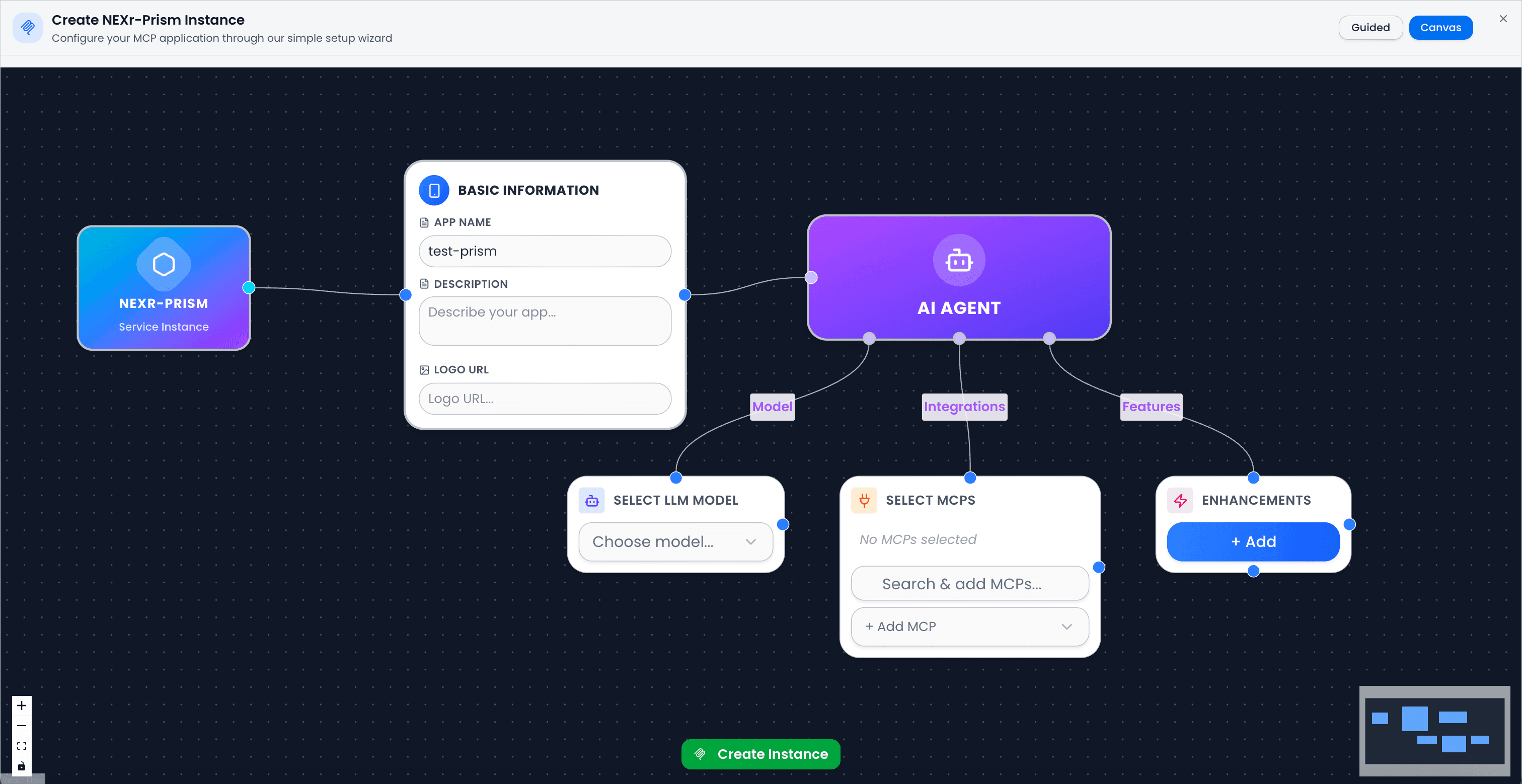
The Canvas mode provides a visual, node-based interface for configuring your Prism application:
- Drag-and-drop interface: Intuitively design your application flow
- Visual connection mapping: See how components connect in real-time
- Node-based architecture:
- NEXr-Prism Service Instance (Blue node): Your application entry point
- Basic Information (White panel): Configure app name, description, and logo
- AI Agent (Purple node): Configure the three key components:
- Model: Select LLM (Brain)
- Integrations: Add MCP connections (Data & Integration)
- Features: Define enhancement instructions (Custom Logic)
- Real-time configuration preview: Changes reflect immediately
- Visual feedback: Connection lines show data flow between components
Use Cases
Business Operations
Data Analysis
API Integration
Creating an Instance
POST /api/service-instances

{
  "instanceName": "Sales Analytics App",
  "serviceId": "nexr-prism-service-id",
  "servicePlanId": "enterprise-plan-id",
  "subaccountId": "your-subaccount-id",
  "globalAccountId": "your-global-account-id",
  "config": {
    "mcpPrism": {
      "appConfiguration": {
        "name": "Sales Analytics",
        "description": "Real-time sales reporting and analytics",
        "logoUrl": "https://example.com/logo.png"
      },
      "mcpIntegrations": {
        "count": 2,
        "details": ["mcp-salesforce", "mcp-analytics"]
      },
      "llmConfiguration": {
        "model": "gpt-4-turbo-preview",
        "provider": "OPENAI"
      },
      "enhancementInstructions": {
        "count": 1,
        "instructions": [
          {
            "id": "enhancement-1",
            "instruction": "Generate monthly sales reports by region"
          }
        ]
      }
    }
  }
}
Updating Configuration
PATCH /api/service-instances/{instanceId}

{
  "config": {
    "mcpPrism": {
      // Updated configuration
    }
  }
}
Launching an Instance
POST /api/service-instances/{instanceId}/launch

// Returns launch URL and access token
{
  "launchUrl": "https://prism-app.nexr.cloud/...",
  "token": "..."
}
Enterprise Features
Security & Access Control
- RBAC: Role-based access control at multiple levels
- Service Keys: API key management for programmatic access
- User Management: Granular permission control
- Audit Logs: Complete activity tracking
Observability
- Usage Metrics: Real-time application usage tracking
- Performance Monitoring: Application performance insights
- LLM Analytics: Track AI model usage and costs
- Custom Dashboards: Build monitoring views
Scalability
- Auto-scaling: Automatic resource allocation
- Load Balancing: Distributed request handling
- High Availability: 99.9% uptime SLA
- Multi-region: Deploy across global regions
Database Schema
NEXr Prism configuration is stored in the ServiceInstance model:
model ServiceInstance {
  id           String   @id @default(uuid())
  instanceName String
  config       Json     // NEXr Prism configuration stored here
  status       InstanceStatus
  // ... other fields
}
The config JSON structure:
interface PrismConfig {
  mcpPrism: {
    timestamp: string;
    type: 'nexr-prism';
    appConfiguration: {
      name: string;
      description: string;
      logoUrl?: string;
    };
    mcpIntegrations: {
      count: number;
      details: string[]; // MCP IDs
    };
    llmConfiguration: {
      model: string;
      provider: string;
    };
    enhancementInstructions: {
      count: number;
      instructions: Array<{
        id: string;
        index: number;
        instruction: string;
      }>;
    };
  };
}
Best Practices
Start Simple
Begin with basic features and iterate based on user feedback
Clear Instructions
Write detailed enhancement instructions for better AI behavior
Test Thoroughly
Validate configurations in development before production deployment
Monitor Usage
Track LLM usage to optimize costs and performance
Pricing
NEXr Prism offers flexible pricing based on:
- Base Service: Instance provisioning and hosting
- LLM Usage: Consumption-based AI model usage
- MCP Connections: Number of active integrations
- Data Volume: Processing and storage requirements
Contact sales for enterprise pricing and volume discounts.
Support & Resources
Documentation
Comprehensive guides and API references
Support Portal
24/7 technical support and ticketing
Community
Join our developer community
Examples
Sample applications and templates
Getting Started
Ready to transform your business operations with NEXr Prism?
Need help? Contact our support team at support@nexr.cloud or schedule a demo with our solutions architects.